When do we use a Singleton ?
Singleton Design Pattern is used when we need to
- Make sure we have only a single instance of a Class at any given time
- Provide global access to the Class instance
How to create a Singleton ?
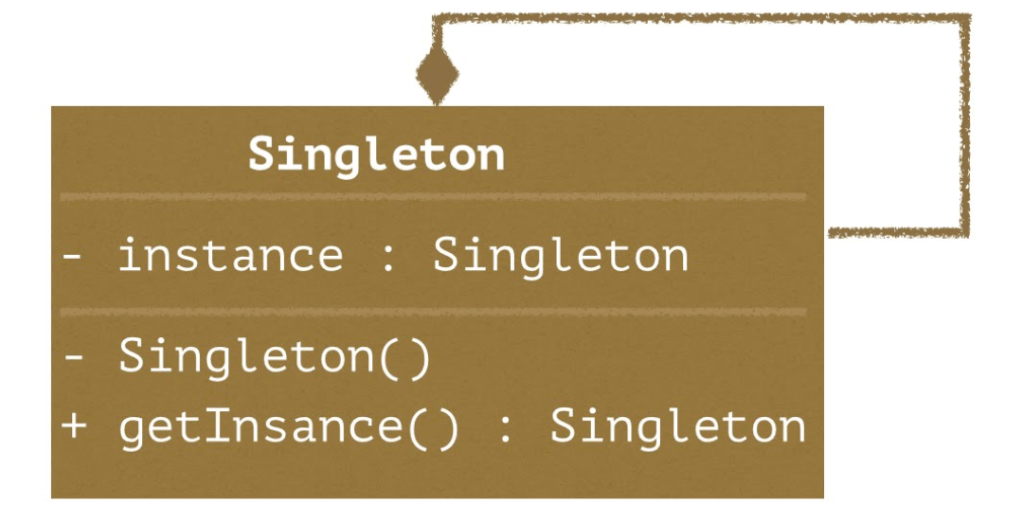
To create a Singleton we need the following :

- private Constructor() so that creation of new instances out of the class is ruled out
- static private Singleton instance variable which is an instance Singleton class.
- getInstance() method that returns the same instance at any given time.
Singleton sample Code…
class Singleton
{
    //Cannot be accessed directly outside of this class
    static private Singleton instance;

    //Cannot instantiate the class to create new Objects
    private Singleton() { };

    public static Singleton getInstance()
    {
         //If instance is not created create a new one
         if(instance == null)
         {
             instance = new Singleton();
         }
         //return the instance
         return instance;
    }
}
CONS: Why should one avoid using Singleton ?
1. Provides Global scope , might change anytime without our knowledge
2. Assuming we will ever need a single instance of Class is bad design
Example :
Lets assume we have a Chat Application. A chat class is designed to be Singleton assuming the easy access across the Application by user objects. Everything works fine when all users are connected to the same chat room.
Now imagine that there is a design change that requires the chat App to support multiple chat rooms. Everything breaks and requires re-engineering the Chat Application as Singleton cant be broken into multiple instances 😦
3. Unit testing a Singleton class gets hard as a lot of code is dependent on this Singleton. Image how hard it can get to Mock test data on a Singleton :).
Where can one get away, using Singleton ?
Reading a properties or config file that is used across your Application and does not cause havoc when requirements change.
Example: Config JSON file
{
"serverURL" :  "avinash.tech",
"port" : "8080",
"outputPath" : "output.log"
}
Singleton class can be used to read the config file so that it can be used across the Application.
Interview question 😛
Why not use Static class instead of Singleton ? Static class looks exactly the same !!
Static Class : Is initialised as soon as the program execution starts.
Singleton : Initialised only when a call to the getInstance() is made for the first time.
Hope it helped to understand Singleton and the idea behind it. Avoid it as much as possible :).
 Avinash.tech(...)